

Periods
Periods are financial periods (usually a month) into which the financial year is divided. Note : In MonetShark, it is possible to set the financial year to start not necessarily on January 1. The top filter (All/Open) shows the current or all periods:
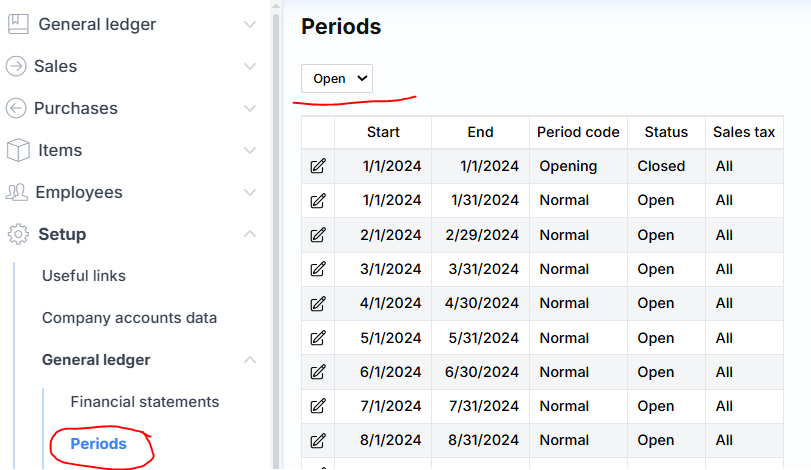
The period allows you to control the posting. There are two types of control: general ( Status field ) and VAT module ( VAT field ). In the first case, in the Status field, select Suspended (if you want to restrict only temporarily) or Closed (if you want to block permanently). The typical setting In operation means that you can freely post.
Attention : after closing the financial year, the periods of that year are automatically blocked.
In the second case, the registration of only those transactions where VAT transactions occur ( VAT field ) is limited. If you want to block, select the value All . The value None means that VAT transactions can be freely registered.
Attention : after closing VAT, the VAT period of the corresponding month is automatically blocked.
Periods can be created or deleted:
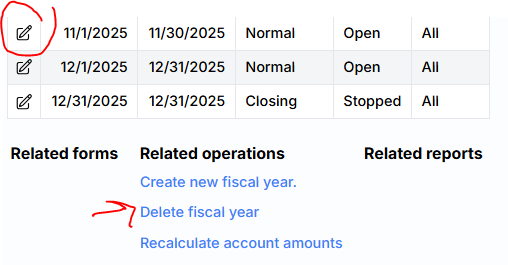
During creation, the first day of the first fiscal year and the last day of the first fiscal year are specified. This way, the system creates the first period (if it has not already been created).
When deleting, the period you want to delete is specified. The system suggests the most recent financial year.
If a bad financial year was created (e.g. it does not start on January 1) and you want to change it, but there are transactions, in this case, after deleting and creating periods, you need to perform an amount recalculation operation. It is initiated by clicking Recalculate account amounts .