

Financial statements
This form allows you to modify or create the desired financial report (e.g., Balance Sheet, Profit and Loss Statement).
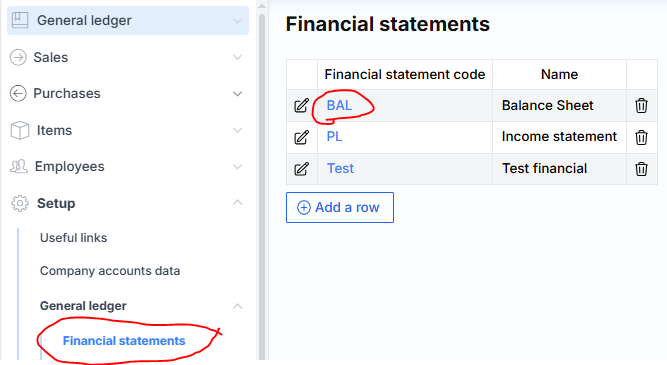
By clicking on the corresponding financial report code, you are taken to its configuration window, where the report lines are displayed.
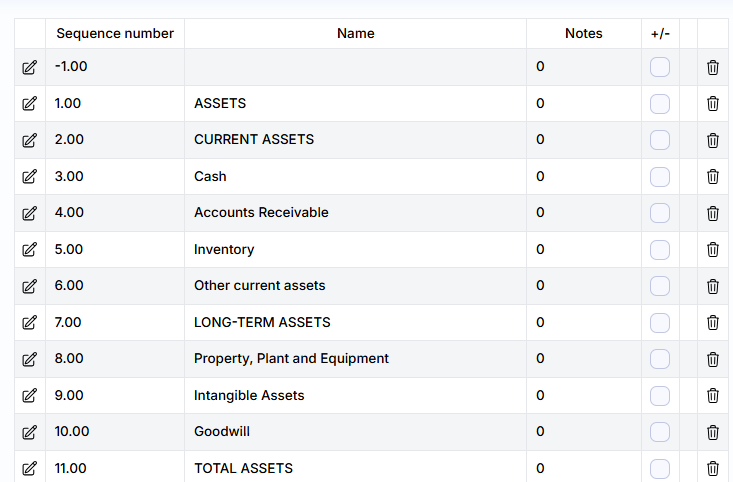
Where:
Sequence number – the line number of the report line.
Name – description of the report line.
Notes – reference number for notes.
+/- – indicates whether the sign of the line amount should be reversed (multiplied by -1).
Report Line Composition – the breakdown of the report line (i.e., which general ledger account amounts it consists of) is accessible by clicking the edit icon and then the amount icon in the opened editing row.
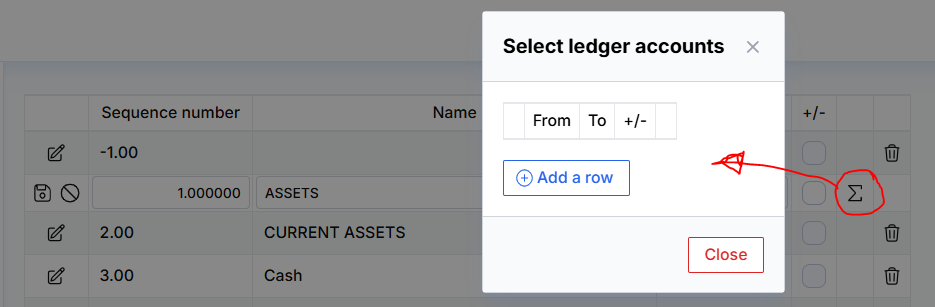
Here you can specify one or more rows, indicating the range of general ledger (GL) accounts to be summed (the “from” and “to” accounts may be the same), as well as whether to reverse the sign (+/-).