

Users
This window lists users who belong to the selected company or group of companies:
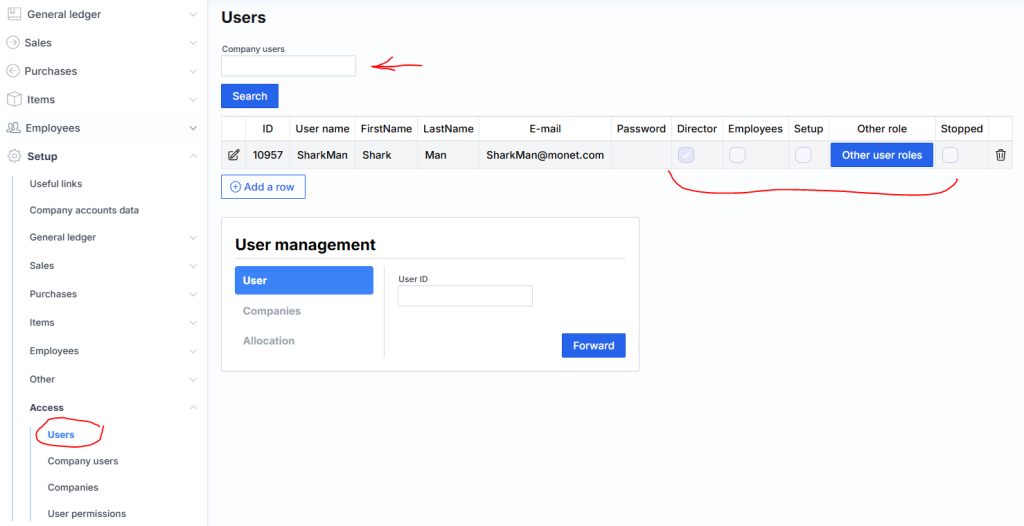
You can search for the desired user(s) in the place marked with a red arrow. After entering the text, the search is performed according to the user’s name, first name, last name, e-mail address. post office
By clicking the edit icon, it is possible to change the user’s name, surname, e-mail address. email, password or assign other roles. Roles allow you to control user access at a higher level than menu restrictions.
The main roles are three:
Director – when checked, shows the first page where profitability, income, cash flow, graphs are displayed;
Emploee – Ability to access the payroll module.
Settings – access to the settings menu.
Other roles are as follows:
Reports – access only to reports
Reports-no – reports cannot be opened
Bank – in integrated banks it is possible to read statements at any time
Production – access to the assembly module
GPAIS – access to the GPAIS module
Intrastat – access to the Intrastat module
Customer Contracts – customer contracts management and automatic issuance of sf
monet.lt – access to forms
POS – cash register system user, does not have access to accounting
webService – access to API methods
OCR – access to invoice recognition module
A new user can be created by clicking the Add a Row button at the bottom.
The lower wizard allows you to assign (grant access) used to several companies at once:
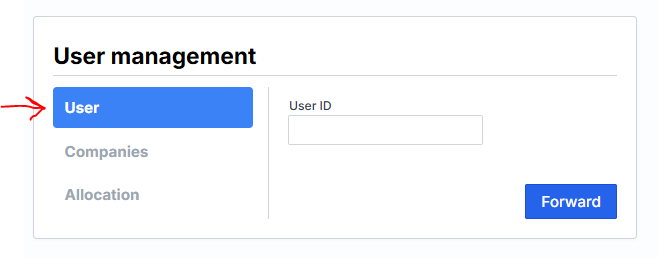
The first step is to enter the user’s login name. The second one shows the companies it can be assigned to by placing a check mark next to the name. The last step is access.