Automatic settlement of suppliers
Settle
Automatic settlement of supplier transactions can be found in the menu: Purchases/Functions/Settle
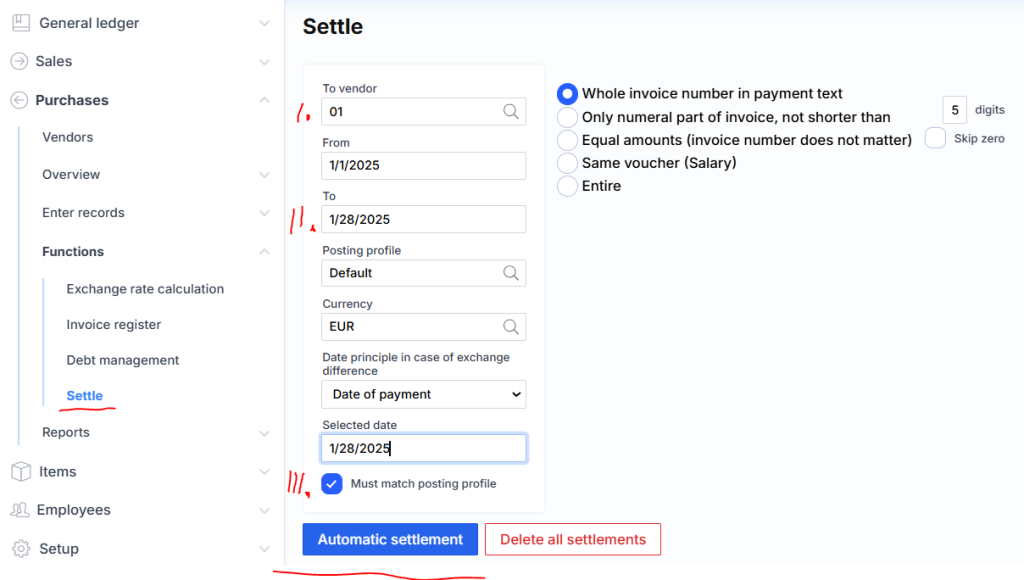
The settlement of customer transactions is analogous to that of suppliers, so the following discussion uses the supplier as an example.
1 – the parameter specifies whether you want to settle all suppliers or just one.
2 – the parameter selects the time interval for invoices and payments. If nothing is specified, the date is ignored.
3 – only those transactions whose GL links match are settled.
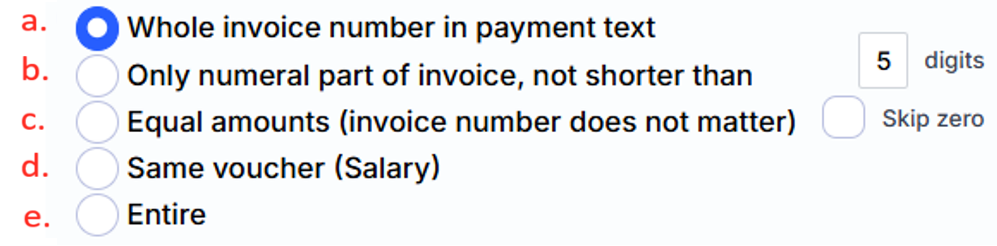
a – the strictest condition for settling invoices with payments. In this case, both the series and number must be present in the payment text. For example: “payment according to sf WRR-0000023”.
b – only the numerical value of the account number in the payment text with a digit limit is viewed. For example, if the digits are 5: “payment according to sf 00023”.
c – settled only if the invoice and payment amounts match.
d – all accounts with payments are settled using the FIFO method.
Clicking the Automatic Settlement button starts the execution.
Adjustment
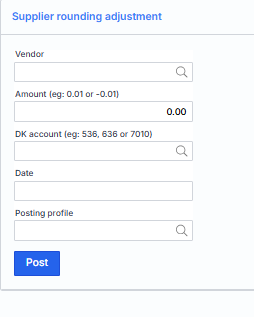
Sometimes there are cases when all amounts for a supplier are settled, but the balance is not zero. In this case, entering a new transaction does not solve anything, because there is nothing to settle the entered amount with. To solve this problem, a new function Supplier Rounding Adjustment has been created :