

Counting items
This type of journal is intended for entering the results of inventory of items. The upper part consists of:
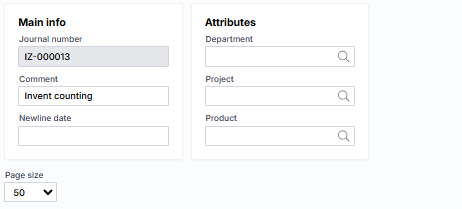
where
Main info
Journal number – a unique journal number assigned by the system.
Comment – a description or note of the journal.
Transaction date – the date the transaction was recorded.
Attributes
Department – suggested department when creating new lines.
Project – suggested project when creating new lines.
Product – suggested product when creating new lines.
The journal lines section consists of the following fields:

Where the warehouse, batch, and package are displayed depends on the product dimensions setting. The field descriptions are as follows:
Item – select the product code.
Item name – transfer the product name from the product card.
Warehouse – specify the warehouse where the product is inventoried.
Serial no. – specify the series by which the product is inventoried.
Package no. – specify the package in which the product is inventoried.
On-hand quantity (according to accounting) – displays the available “accounting” quantity.
Found – enter the quantity found during the inventory.
Result – the system calculates the difference between the on-hand and found quantity.
Profit amount – specify the amount by which the found quantity is collected.
Buttons:
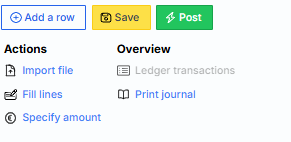
Where are the first three typical:
Add row – creates a new empty journal row.
Save – saves journal data on the server.
Post – registers a journal that never generates G/L transactions in the event of a transfer.
There are also additional:
Import file – the ability to import data from a text file.
Fill lines – the system suggests inventory lines.
Specify amount – the system suggests the amounts of goods receipts based on historical data.
Ledger transactions – ledger transactions generated after the exhibition registration related to this journal. The link is inactive until the journal is registered.
Print journal – prints the inventory description.