

Getting started
Menu layout principle
The standard menu consists of five main modules and their setting:

The module consists of the following elements (eg: General ledger):
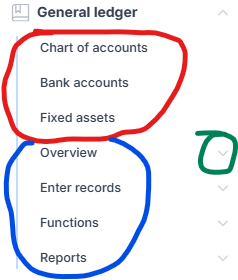
where the red-circled part represents the module’s main lists, the blue part, which can be expanded by pressing the green-circled arrow, consists of the standard elements:
- Overview – consists of forms where no information is entered, but data can be viewed.
- Enter records – consists of forms through which records are entered.
- Functions – consists of forms through which certain general functions related to the respective module can be performed.
- Reports – lists reports related to the relevant module.
The setup menu item consists of all module settings forms.