

General ledger operations
Any transaction can be entered through the general journal, as long as it is not related to goods. This journal is most often used to enter accounting transactions, a set-off between a supplier and a customer or different customers/suppliers, a debt write-off, or a transaction related to the closing of the year. Below are some examples of when a set-off is entered. This example reflects a situation where a set-off is made with the same G/L links:
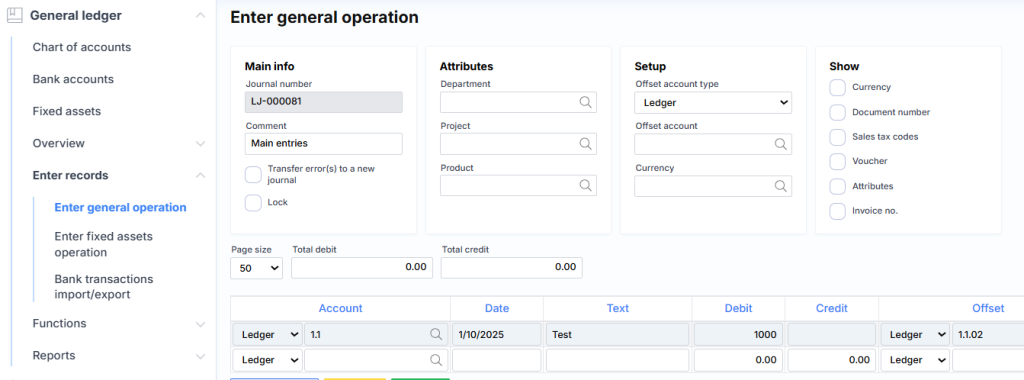
Offsetting vendor and customer:
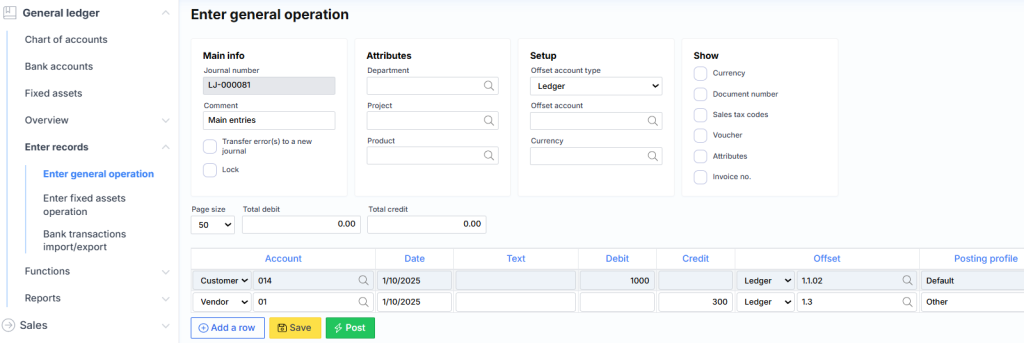
Receipt
When entering transactions of this type or similar, an important nuance is the receipt number. It is assigned automatically according to the specified numbering. In the case of offsetting, it is desirable that the receipt be the same for both lines, i.e. there would be a direct link between the transactions when looking through the transactions of suppliers/customers and when changing the date or deleting the transaction, both related transactions would be changed/deleted.
Thus, a new receipt number is assigned to the second and subsequent lines if the journal line above does not have a value specified in the Account field or the Correspondence field and the line being edited does not have a value specified in the Account field or the Correspondence field . For example:

or

You can check whether the system assigned the receipt as intended by checking the Receipt field in the Notes section.
When it comes to receipts, the important nuance is the transaction date. If two lines in the journal have the same receipt, adjusting the date of one line will change the date of the other line.
Other fields
Move rows with errors to a new journal – when registering more rows, the system will move rows that cannot be registered for some reason (e.g., a blocked customer) to another journal, and leave the remaining correct ones in the existing one and register them.
Block – you can block the journal for logging.
Fields in the Attributes section – allow you to specify attributes that the system will assign to rows. You can also specify attributes for each journal row separately. In this case, you need to select the Show Attributes check box in the Attributes section .
In the Setting section, you can specify that a certain currency or correspondence should be the default when creating rows, meaning you don’t have to select the same value in each row.
The checkboxes in the Show section allow you to show or hide less frequently used fields.
The Page Size field is useful when working with large logs. It tells the system how many rows to read from the database. The smaller this number, the faster the data is loaded and saved.
The Total Debit and Total Credit fields show the total amounts for the entire journal. Useful for checking whether large journals have been entered correctly.