

Fixed asset card
The fixed asset (FA) card consists of the following fields:
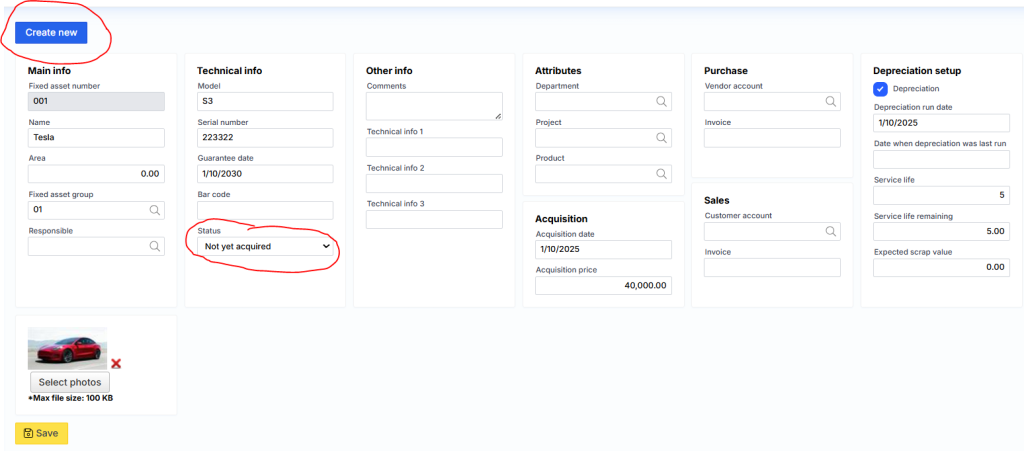
Where it is important to specify the asset group. Another necessary part of FA is the calculation of depreciation. Here you need to specify from when, how many months it will be used and what the scrap value is.
It is recommended to specify the scrap value for the FA that we want to explicitly write off. If no scrap value is specified, FA will automatically change its status to Closed when it is depreciated.
Main information
Fixed asset number – fixed asset card code, which must be unique.
Name – a description of the fixed asset.
Area – indicates the area related to the IT card.
Fixed assets group – a category of fixed assets, e.g.: furniture, buildings, etc.
Responsible – assigned employee.
Technical information
Model – specifies the IT model.
Serial no. – the IT serial number is entered.
Guarantee date – the date of validity of the warranty is indicated.
Barcode – enter a barcode.
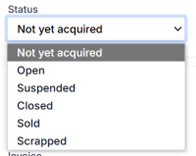
Status – indicates the status of the asset:
where
- Not yet acquired – the initial state, when the asset is not yet acquired, but only a created card.
- Open – the asset is used in the company’s operation.
- Suspended – asset operations are suspended.
- Closed – The asset is fully depreciated.
- Sold – Occurs after the asset is sold.
- Scrapped – occurs when an asset is written off.
Other information
Comments are free-form comments
Information 1 – additional information about the property.
Information 2 – additional information about the property.
Information 3 – additional information about the property.
Attributes
Department – an attribute of the proposed asset attribute.
Project – an attribute of the proposed property.
Product – an assignable property attribute.
Acquisition
Date of acquisition – entered manually or recorded by the system when the asset was acquired.
Acquisition price – entered manually or recorded by the system, how much the property was acquired for.
Purchase
Vendor – the code of the provider from which the asset was acquired is entered manually or captured by the system.
Invoice – the purchase invoice number is entered manually or recorded by the system.
Sales
Customer – the code of the customer to whom the property was sold is entered manually or recorded by the system.
Invoice – the sales invoice number is entered manually or recorded by the system.