

Enter a general operation
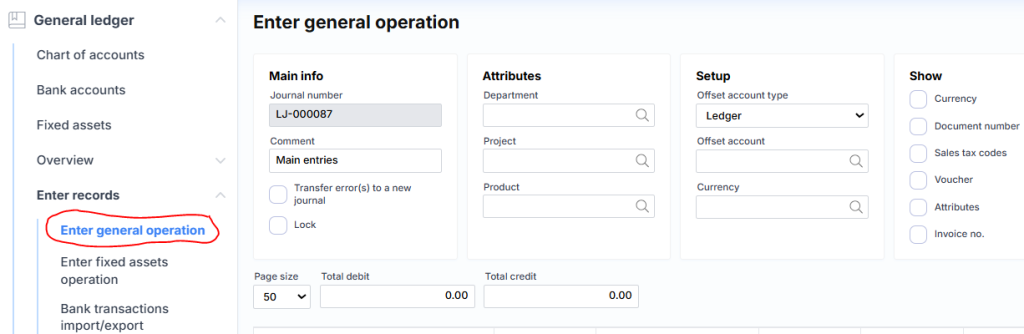
The main journal through which any transactions can be posted (except inventory). The upper part consists of the following fields:
where:
Main information
Journal number – unique log number assigned by the system.
Comment – description or note of the log.
Move rows with errors to new log – If checked, logging will log good rows and move rows with errors to a new log.
Lock – it is possible to block the log for logging.
Attributes
Department – the proposed division when creating new rows.
Project – the proposed project when creating new rows.
Product – the product offered when creating new lines.
Setup
Offset account type – suggested correspondent account type when creating new lines.
Offset account – a correspondent account is offered when creating new lines.
Currency – Suggested currency when creating new rows.
Show
Currency – Shows/hides the currency column.
Document No. – shows/hides the document number column.
Sales tax codes – show/hide VAT columns.
Voucher – shows/hides the voucher column.
Attributes – shows/hides attribute columns.
Invoice no. – shows/hides the account number and pay to columns.
The middle part consists of the following fields:

Page size – specifies how many lines to display on one page. Useful when working with large amounts of data.
Debit Total – Shows the total amount from all rows in the debit column.
Credit Total – Shows the total amount from all lines in the credit column.The lower part (list type) consists of the following fields:

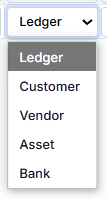
Ledger – selected from the account from the chart of accounts;
Customer – optional customer;
Vendor – selected supplier;
Asset – optional long-term assets;
Bank – selectable bank.
Date – indicates the financial date of the transaction.
Text – description of the operation.
Debit – debit amount.
Credit – credit amount.
Correspondence – the relationship of accounts on the same receipt, where the type can be the same as the Account field.
Tax group – customer/supplier VAT code.
Item tax group – product VAT code.
Invoice no. – purchase or sales account number.
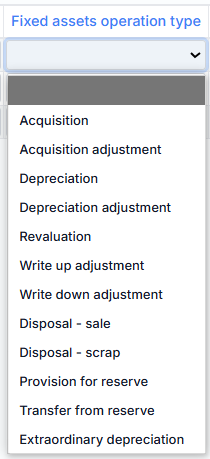
Fixed assets operation type – fixed asset transaction type, where possible values are:
Document No. – number of the document related to the transaction.
Department – the department attribute is assigned to the operation.
Project – a project attribute is assigned to the operation.
Product – the product attribute assigned to the transaction.
Pay by – specifies the date by which the bill must be paid. At the bottom are the following buttons:
where:
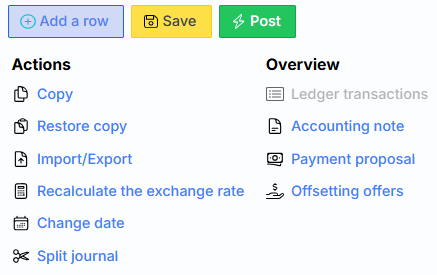
Typical buttons
Add a row – Creates a new empty log row.
Save – Saves the log data to the server.
Post – the journal is registered financially (recorded in the general ledger and related modules).
Actions
Copy – saves a copy of the log.
Restore Copy – Loads data from a saved copy of the log.
Import/Export – Invokes the form through which log data is imported or exported.
Exchange Rate Recalculation – recalculates the exchange rate applied to the journal lines, for example: after changing the currency code.
Change date – changes the date of all rows to the one specified in the dialog.
Overview
Ledger transactions – G/L transactions related to this journal generated after posting exhibition. The link is inactive until the journal is registered.
Accounting note – generates an accounting statement for this journal.
Payment proposal – opens a form where you can generate journal lines for suppliers who should pay debts.