

Ledger account card
The account type specifies how the general ledger account will be adjusted at year-end closing. There are several options, but the two most commonly used are Balance Sheet and Profit and Loss . When closing a financial year, the balance of the first type of account is carried over to the new financial period. The balance of the second type is carried over to the general ledger closing summary.
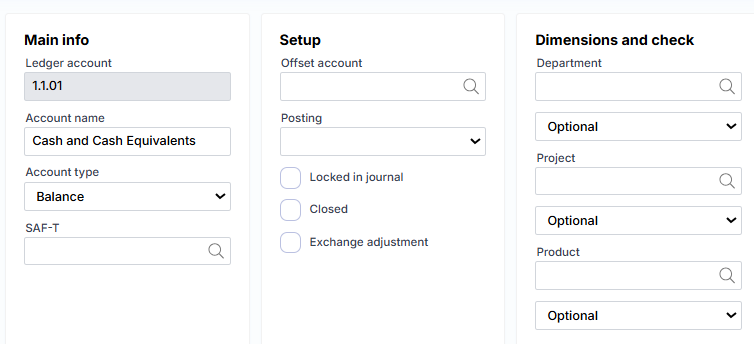
Main information
In the G/L account field , enter the account code itself. It must be unique.
Account Type – indicates the type of account. The three most commonly used are Balance Sheet , Profit & Loss, and Total . The type determines how the G/L account amounts will be treated at year-end closing. Balance Sheet , Assets , Liabilities – the balance is carried forward to the next year. Profit & Loss , Revenue , Expenses – are closed through the 3rd class.
In the SAF-T field, we indicate the account equivalent of the Tax Administration sample chart of accounts.
Setup
Offset account – you can specify a correspondent account that will be suggested in the G/L journal when this G/L account is selected.
Posting – it is possible to limit the posting type so that only certain types of transactions are posted to the G/L account. E.g.: VAT transactions only.
Checkmarks:
Locked in the journal – indicates that it is not possible to register directly to this account. Amounts are entered into it indirectly, through the settings of other modules. E.G.: customer transactions. If this is a synthetic G/L account, then we want the amounts to arrive to it through analytical ones, in this case some customer, and we do not want the amounts to arrive without a customer.
Closed – an account that is no longer in use can be blocked.
Exchange adjustment – specifies whether the G/L account amounts should be valued when assessing the impact of exchange rate changes.
Attributes (Dimensions)
You can control how attributes are assigned to G/L transactions. The following controls are available for each attribute (G/L account card):
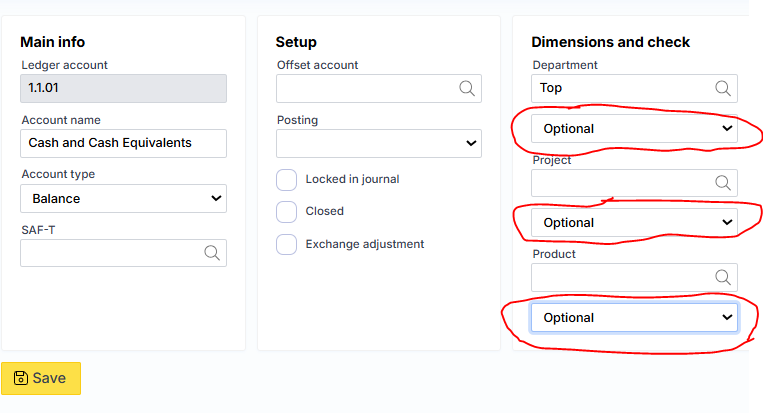
Possible values:
Selected – standard behavior, the attribute may or may not be specified.
To be filled in – it is required that the attribute be specified, otherwise the system will not allow registration.
Table – the system checks whether the value specified in the attribute field (G/L setting) is the same as that specified in the journal.
List – during registration, it is checked whether the attribute specified in the journal is from the list.
Fixed – the system will automatically assign the value specified in the attribute field, regardless of whether the attribute is specified in the journal or not specified at all.
Default – if the value specified in the general ledger journal is used, it will be assigned. If not specified, the attribute value from the general ledger settings will be assigned, if specified.
Sum accounts
If the G/L account type is Total, an additional group of fields appears on the card:
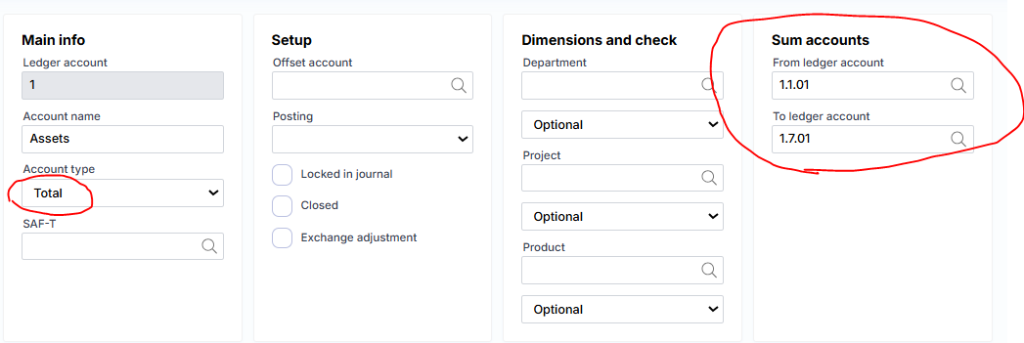
Here one can specify which accounts interval to be used for summation.
Note : You cannot enter transactions directly into a summary ledger account. The summary account only displays amounts from other accounts.