

Intrastat
The Intrastat submodule is designed to generate export or import reports for customs. To use this functionality, you need to upload customs codes. Assign them to the items. Also, indicate the country of origin and net weight for each product.
In addition, the country must be specified for each supplier/customer. After completing these steps and registering purchases/sales, you can generate and submit a report. Clicking on this link will open a window, the management of which consists of several parts:
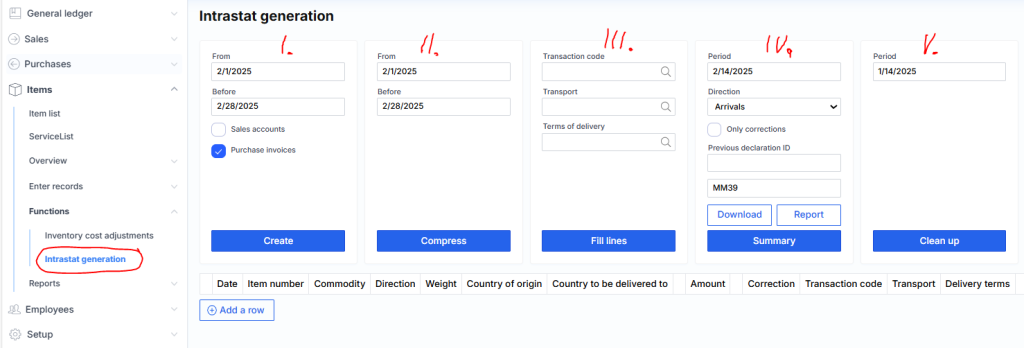
I. – indicating which month and what type (purchase or sale) report is generated;
II. – it is possible (not necessary) to group data by customs codes;
III. – it is possible to assign certain values to previously registered lines in which the required attributes (Operation Code, Transport or Delivery Terms) were not specified;
IV. – generation of the Intrastat declaration itself (Download XML button);
V. – if you need to regenerate or the data is no longer needed, you can delete the selected month.