Automatic settlement of customers
Settlement
Sometimes you need to settle many transactions at once. In this case, the automated settlement function is useful. It can be found in the menu: Sales/Functions/Settle
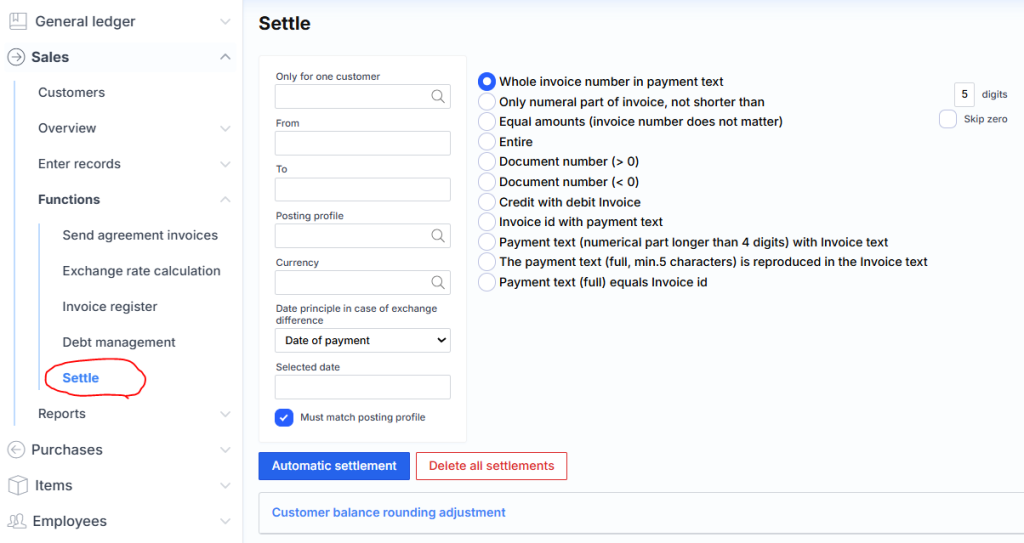
Selection fields in the military section:
For one customer only – specifies whether you want to settle all customers or just one.
From and To – selects the time interval for invoices and payments. If nothing is specified, the date is ignored.
Posting profile – filters and settles selected DK interface transactions.
Currency – filters and settles selected currency transactions.
Date principle in case of exchange rate difference – specifies which date to register if a currency impact change transaction occurs. Payment date means that the date on which the covered payment was registered will be assigned to the currency transaction. Daily date means that the date on which the invoice was registered will be assigned to the currency transaction. Selected date means that the date selected below in the Selected date field will be assigned to the currency transaction .
The G/L interface must match – only those transactions whose G/L interfaces match are settled.
The selection fields on the right:
- Full invoice number in payment – the strictest condition when settling invoices with payments. In this case, both the series and number must be included in the payment text. For example: “payment according to invoice number WRR-0000023”.
- Only numeric SF, no shorter than 5 digits Skip zero – only the numeric value of the account number in the payment text with a digit restriction is viewed. For example, if the digits are 5: “payment by sf 00023”. The Skip zero check box removes zeros from the front of the SF number. For example: the number SF-0000012314 is interpreted as 12314.
- Equal amounts (FI number does not matter) – settled only if the invoice and payment amounts match.
- Full – all invoices with payments are settled using the FIFO method.
- Document number (> 0) – A transaction is settled with an amount greater than zero and the Document number field has a match in the Text field of a transaction with an amount less than zero . Here, >0 means an invoice, because the invoice amount is usually positive, so the invoice document number with the payment text is settled.
- Document number (< 0) – A transaction with an amount less than zero is matched and the Document number field has a match in the Text field of a transaction with an amount greater than zero . Here, <0 means payment, as the payment amount is usually negative, so the payment document number is matched with the invoice text.
- Credit notes with invoice – credit notes with the corresponding number are covered by a simple invoice. For example: SF-000012 with credit note SF-000012S.
- Invoice with payments – covers a simple invoice with payment, in which the test is similar to an invoice (condition payment text = %invoice number%).
- Payment text (numeric part longer than 4 digits) with invoice text – the payment text (only the numeric part, e.g.: BOOK789798797WW -> 789798797) with invoice text is covered.
- Payment text (full) with invoice text – overlays the payment text (full part – letters and numbers) with the invoice text.
Clicking the Automatic Settlement button starts the execution.
Delete all settlements button – deletes (distinct from uncovering) all uncoverings for the selected client.
Attention : When you select delete, the deletion is performed for all operations, regardless of the date range in the From and To fields .
Adjustment
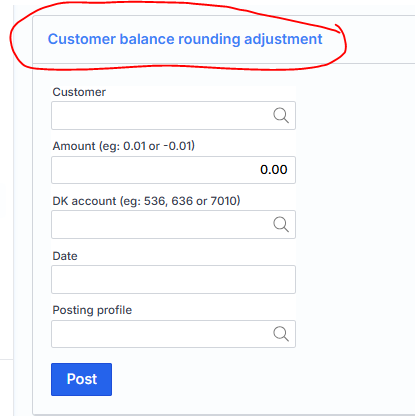
Sometimes there are cases when all customer amounts are settled, but the balance is not zero. In this case, entering a new transaction does not solve anything, because there is nothing to settle the entered amount with. To solve this problem, a new function Customer Rounding Adjustment has been created :