

User permissions
User rights can be restricted at two levels. By the administrator and by another user. In the first case, rights are changed by contacting the administrator, which allows for a higher level of security and greater flexibility.
In the second case, the user’s rights can be adjusted by another user in this form :
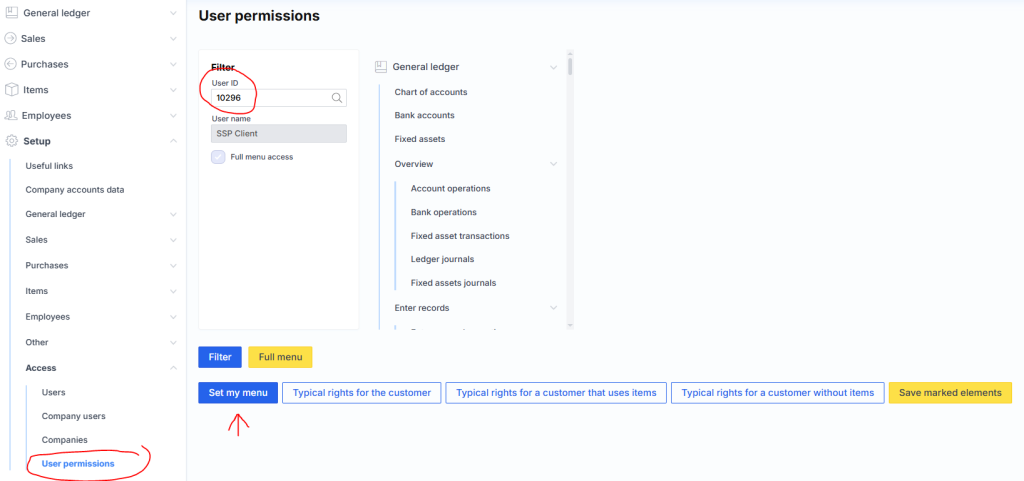
Full menu access – shows whether the user has full access to the menu, i.e. can see (but not necessarily open, it also depends on the roles available) the entire menu.
Filter – filters out the rights of the user selected from the list (field User ID ).
Full menu – provides access to the entire menu.
In the lower part, user rights are changed by adding or removing checkmarks:
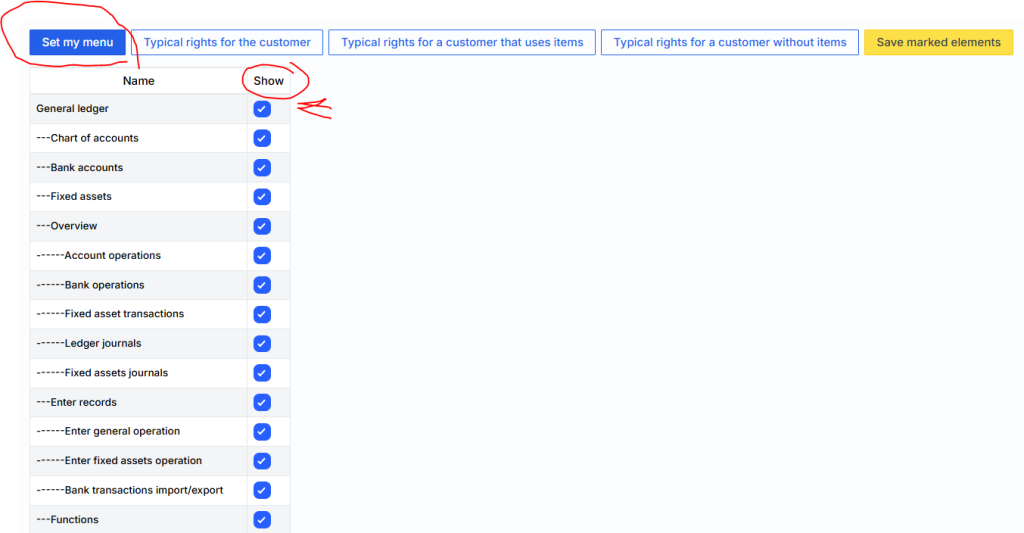
Attention : when you place a check mark on a lower-level menu item, e.g.: G/L Journals , a check mark is automatically placed on the headers of the parent items (e.g.: Review and General Ledger ).
As my menu – grants the selected user the same menu rights as the granting user.
Typical rights for customer – grants typical rights for a regular user.
Typical rights for customer with goods – grants typical rights for a regular user whose company uses the goods module.
Typical rights for customer without goods – grants typical rights for a regular user whose company does not use the goods module.
Save marking – saves the marked checkmarks on the server, clicked when finishing the adjustment.