Enter records
Enter customer payment
This form records the client’s payment. Since bank transactions are usually imported, this form is most convenient for entering or issuing cash receipt orders. The top section consists of the following fields:
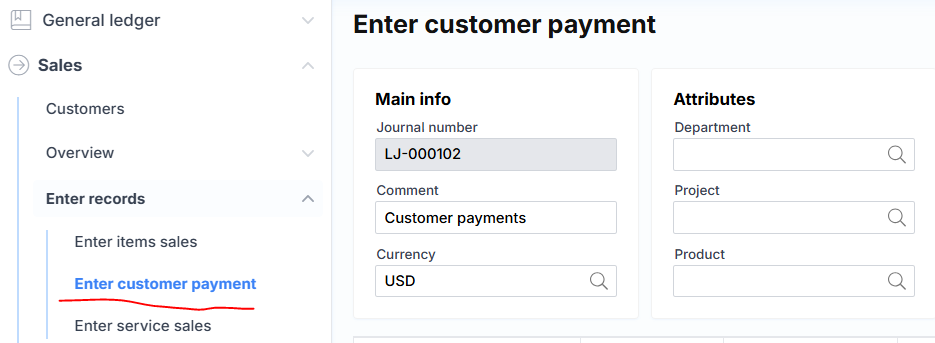
Where:
📌 Main Information
- Journal Number – A unique journal number assigned by the system.
- Comment – A description or note about the journal.
- Currency – The transaction currency, usually suggested based on company settings.
🧩 Attributes
- Department – Suggested division when creating new lines.
- Project – Suggested project when creating new lines.
- Product – Suggested product when creating new lines.
📄 The journal line section includes the following fields:

Where:
🧾 Journal Line Fields
- Client Abbreviation – The client’s code.
- Date – The financial date of the transaction.
- Description – A description of the transaction.
- Amount – The payment amount entered.
- Credit – The credit amount.
- Correspondence
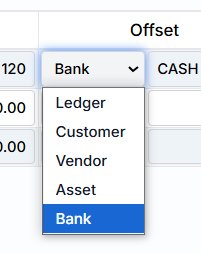
Bank is the most commonly used type, and a cash register code (identifier) is selected.
Document Number – This can be entered manually (if a printed cash receipt order is being recorded), or if left blank and the cash receipt order is generated from Monet, the system will assign the number automatically.

🔘 Standard Buttons:
- Add Line – Creates a new empty journal line.
- Save – Saves the journal data to the server.
- Post – Posts the journal financially (records it in the general ledger and related modules).
➕ Additional Options:
- GL Transactions – After posting, displays the generated general ledger transactions related to this journal. The link is inactive until the journal is posted.
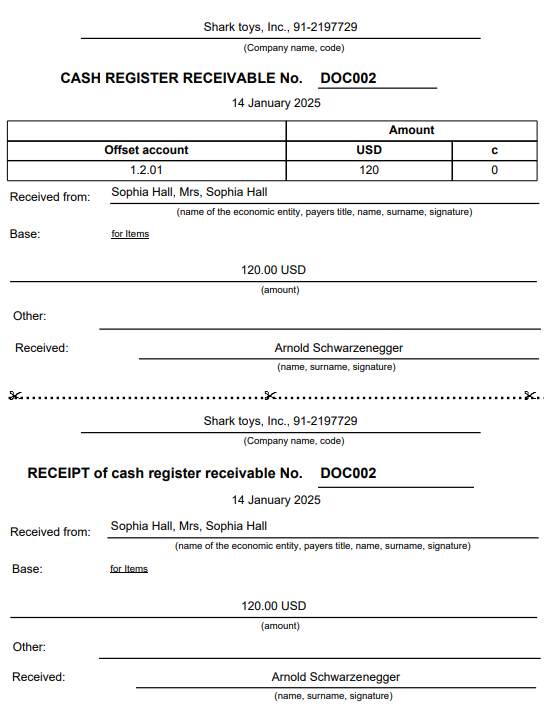
- Print Cash Receipt Order – Generates a cash receipt order. The document will appear as follows: