

Enter fixed assets operation
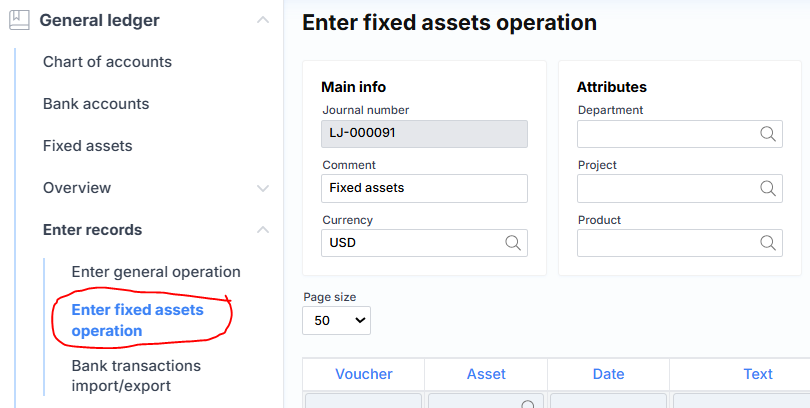
A journal form adapted for more convenient management of fixed asset transactions, although the same data can also be entered through the general journal. The upper part consists of this element:
where
Basic information
Journal number – a unique journal number assigned by the system.
Comment – a description or note of the journal.
Currency – the currency of the transaction, usually suggested by the company settings.
Attributes
Department – suggested department when creating new lines.
Project – suggested project when creating new lines.
Product – suggested product when creating new lines.
The journal lines section consists of the following fields:

where,
Voucher – the system-generated ledger transaction number.
Asset – the fixed asset card code is selected.
Date – the financial date of the transaction is indicated.
Text – the transaction description.
Debit – the debit amount.
Credit – the credit amount.
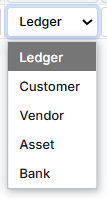
Offset – the account relationship in the same receipt, where the type can be one of five:
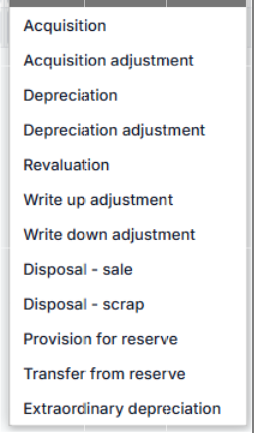
Asset transaction type – type of fixed asset transaction, where possible values are:
Buttons:
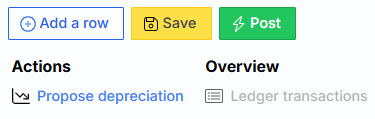
Where are the first three typical:
Add Row – creates a new empty journal row.
Save – saves the journal data to the server.
Post – posts the journal financially (records it in the general ledger and related modules).
Also two additional ones:
Propose depreciation – system creates journal lines for asset depreciation.
Ledger Transactions – after posting, the general ledger transactions related to this journal are generated. The link is inactive until the journal is posted.