

Bank account card
A bank account card looks like this:
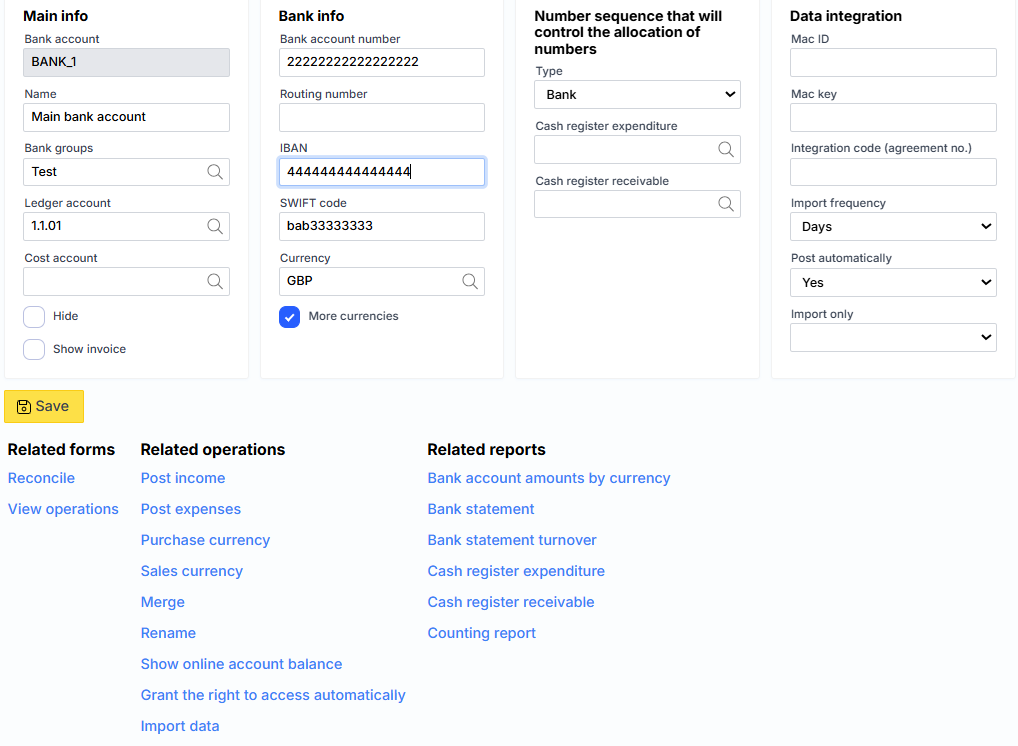
where:
Main information
Bank account – bank or cash account code, which must be unique.
Name – a description of the bank or cash register.
Bank group – the specified credit institution.
Numbering, which will control the assignment of numbers
Cashier’s expense order – numbering used for cashier’s expense orders. If not specified, common company numbering will be used.
Cash receipt order – numbering used for cash receipt orders. If not specified, common company numbering will be used.
Bank information
Bank account number – bank account number that matches the IBAN code.
SWIFT code – is used to identify the payee’s country, bank and bank branch where the recipient’s account is registered, which must be specified if an international transfer is made. The BIC code is the same thing.
IBAN is an international bank account number format used by banks to credit funds to the recipient’s account. IBAN numbers are used in the European Union and some other countries for international and local money transfers.
Mac ID, Mac key and Integration code (sat. no.) – used for bank integrations.
Setting
G/L Account – General Ledger Cash Account.
Expense account – the general ledger account to which bank commissions are recorded. For now, it only works for Paysera imports.
Currency – the main currency of the bank account.
More currencies – indicates whether to allow registration of transactions in other currencies.
Show SF – If this check box is selected, the system will show this bank account on the sales invoice printout to the customer.
Hide – it is possible to block the display of the account in the list.
Type – it is indicated whether it is a bank account, a cash register or another type.
Import frequency – specifies how often Monet should read transactions from the bank. This can be, for example, an hourly, daily or monthly periodicity.
Register automatically – if checked, the system will attempt to register itself after creating the import log. Otherwise, the log will remain open and must be registered by the user.
Import only – allows you to choose to import only receipts ( Credit amount ) or only expenses ( Debit amount ). If nothing is selected, all transactions will be imported.
Showing a bank account on a sales invoice
To display this account data among the details when printing invoices, check the Show Invoice box.